
Lokinode
The native desktop client for the Flokicoin Lightning Network. Deploy and run your Lightning node as a seamless background service.
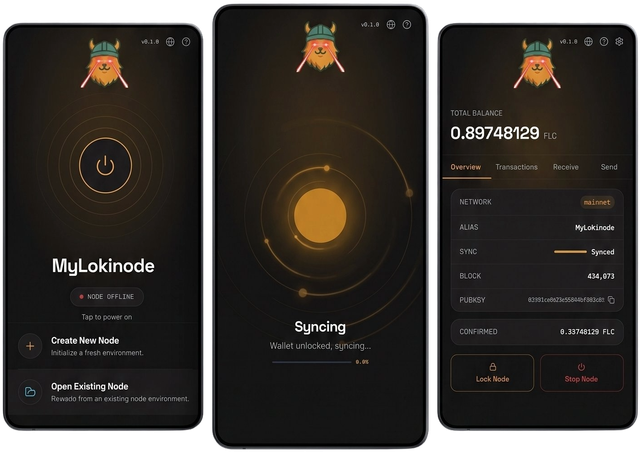
Lokinode is a cross-platform desktop application that provides a graphical interface for running and managing a Flokicoin full node (FLND). It allows you to operate an on-chain wallet and participate in the Flokicoin Lightning Network (FLN).
Features
- Background Service: Lokinode runs as a persistent service. You can close the user interface while the node continues to run in the system tray.
- On-chain Wallet: Initialize and unlock your wallet, send/receive FLC, and view transaction history.
- Node Management: Monitor block height, sync status, and mempool tip. View application logs directly in the interface.
- Multi-Node Profiles: Run and manage multiple nodes on the same machine. Lokinode automatically tracks your data directories and configurations, allowing you to quickly switch between different node profiles.
Installation and Setup
If you already use tWallet, no migration is needed. Your 24-word seed phrase is fully compatible. Even better, because both applications share the same default data directories, Lokinode will automatically detect your existing node. You can simply launch the app and power on your default node profile with zero setup required.
- Download: Download the executable for your corresponding operating system.
- Node Configuration: Launch Lokinode. The setup wizard will first ask you to set a public alias and select a local data directory.
- Wallet Setup: Choose to either create a new wallet (which provides a new 24-word seed phrase) or restore an existing one via mnemonic.
- Security: Set a strong encryption password to protect your local data.
- Sync: Once the node boots, it will automatically begin synchronizing with the Flokicoin blockchain.
For Node Operators & Developers
If you are looking to deploy a headless node on a VPS or run automated operations, you have two primary options:
Automated Server Setup
A plug-and-play Docker bundle for VPS deployments. It automates the setup of flnd and Lokihub with a single script, making it perfect for running a 24/7 cloud node.
Direct flnd
Run the flnd daemon directly for maximum control. This is the core backend service that can be managed entirely via CLI or RPC.
Managing with Lokihub
While Lokinode handles running your background Lightning node and provides an interface for basic on-chain wallet operations, you must use Lokihub for advanced Lightning Network features.
When you open Lokihub on the same machine, it will automatically attempt to connect to your active Lokinode directory, unlocking the following capabilities:
- Liquidity Management: Open, close, and monitor Lightning channels to manage your inbound and outbound capacity.
- Sub-Wallets: Create dedicated wallets to organize your funds for different applications or personal budgets.
- App Integrations (NWC): Seamlessly connect external applications to your node using Nostr Wallet Connect, with granular permission controls.
View the Lokihub Setup Guide →
Data Locations
By default, Lokinode stores blockchain and wallet data in the following directories:
| OS | Default Path |
|---|---|
| Linux | ~/.flnd/ |
| macOS | ~/Library/Application Support/Flnd/ |
| Windows | %APPDATA%\Flnd\ |
Beyond these default paths, you can create a new profile in a custom location or move an existing profile by copying its data directory to a new path and reopening it through the application's profile management.
CRITICAL: Lightning Backups
Your 24-word seed phrase only recovers on-chain funds.
To recover funds locked in open Lightning channels, you need a Static Channel Backup (SCB).
Always ensure you have a separate, verified backup of your channel.backup file alongside your seed phrase. Without it, Lightning channel funds cannot be recovered if local data is lost.